

Stop Herding Cats: An AI System for Proactive Stakeholder Management

Hi! Nacho here👋 TL;DR: I’m extending the AI PM Orchestrator series by tackling core PM challenges with AI. First up: stakeholder management. This article offers a practical AI toolkit to automate the endless admin of reporting and Q&A, finally ending the “herding cats” routine. The system is designed to free you up for the high-impact, strategic conversations that truly move the needle.
P.S. And for our Spanish-speaking readers, we’ve just launched Product Direction en Español! You can subscribe here. Same content, in your (our) own language 🙂
You know the feeling. It’s Monday morning, and before you can even finish your coffee, you’re already in the weeds. You’re pulling data for the monthly leadership update due this week, crafting a different summary for the marketing team, and answering the same question about the release date for the third time in a Slack channel.
This is the unspoken part of our job. The constant, reactive, and manual effort required to keep everyone on the same page. We call it “stakeholder management,” but it often feels more like “herding cats.” This operational drag is more than just an annoyance; it’s a direct thief of the time we should be spending on high-impact, strategic work.
But what if we could automate the noise? What if we could build a system that handles repetitive communication?
Let’s jump into an AI-powered toolkit that can handle the burden, explained with tools and examples.

Level 1: Your Centralized AI Knowledge Hub
The foundation of any good communication system is a single source of truth. The problem is, our “truth” is often scattered across dozens of documents in Google Drive, JIRA tickets, Figmas, and even Slack messages.
Solving with an AI Knowledge Hub: Think of it as a private, expert search engine for your project. You feed it all your relevant documents—PRDs, meeting notes, user research, GTM plans, technical specs—and it becomes an expert that your team and stakeholders can query.
How to build it: You don’t need to be a data scientist.
Start simple: Tools like custom Gem or GPTs allow you to upload a set of documents and create a chat interface for them in minutes.
Automate documentation: Use tools like Scribe or Tango to automatically create how-to guides and process documents, which can then be fed into your hub.
One step further: use NotebookLM to create from audio overviews to Q&A bots that answer only from the available docs (avoid hallucinations or web searches).
Even one step further: create a Slack-integrated bot (or any messenger app your company uses) to answer questions directly where people work. This is easier than it sounds: you can use Zapier or n8n to create one in minutes, and use any LLM to answer from your documents.
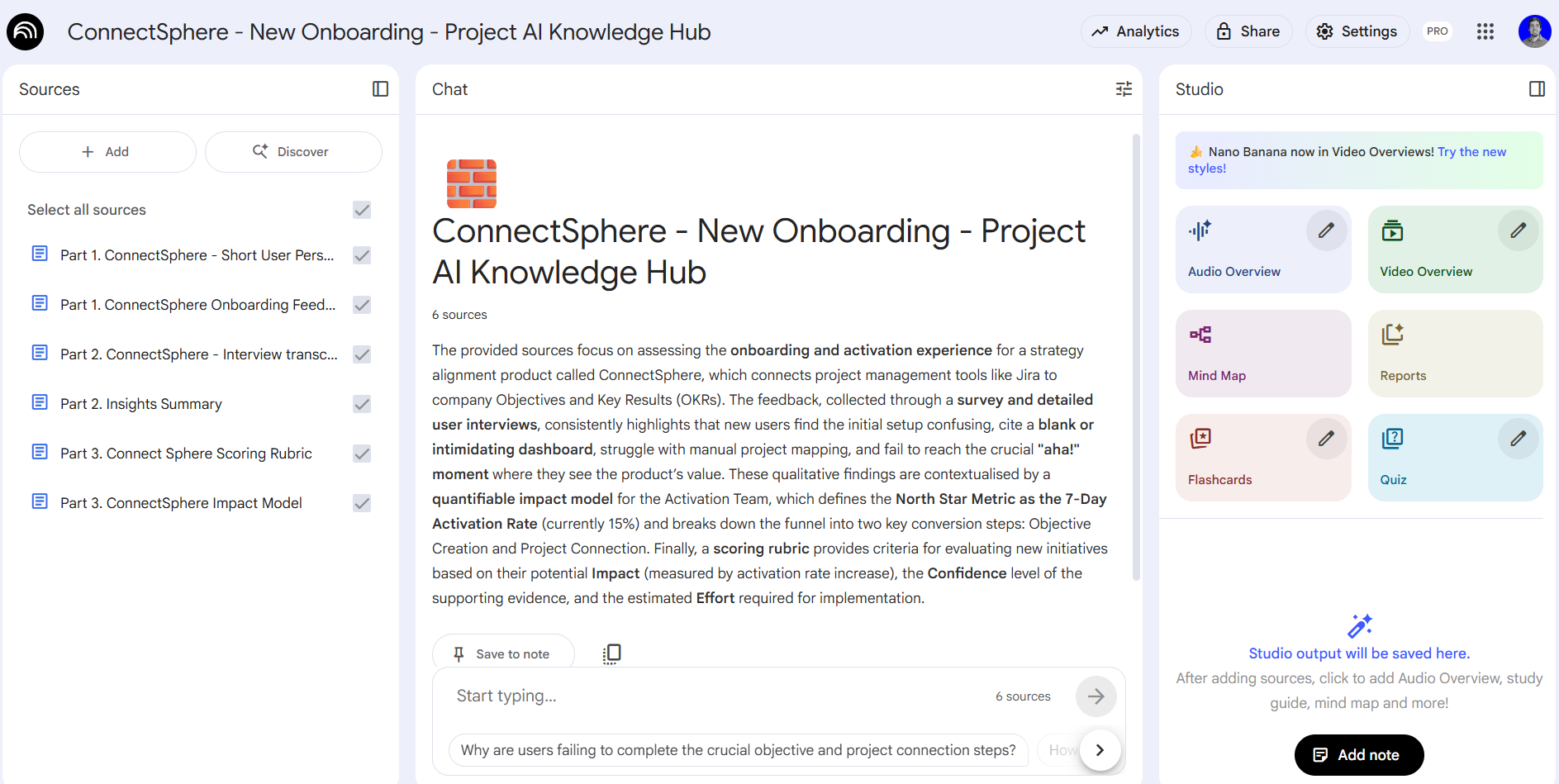
Using the same project files you already have, NotebookLM magically creates a bunch of reference artifacts, overviews, and a chat interface for your Knowledge Hub.

While there are more sophisticated methods, you can create a Slack-bot in minutes with Zapier, sending the questions and your documents for an LLM to answer.
The immediate win: Instead of asking you, a stakeholder can now ask the hub: “What is the primary success metric for the Q4 checkout redesign?” or “Summarize the key findings from the last user interviews.” You’ve eliminated dozens of future interruptions and empowered your stakeholders with self-serve information. This hub is the bedrock for all other automation.
Level 2: The Proactive AI Information Broker
Once your knowledge hub is in place, you can move beyond simply offering self-serve answers. The next level is to turn your AI into a proactive agent that gathers information for you, removing you from the endless loops of chasing people for updates and answers.
You are often a human router, spending hours pinging people on Slack, following up on old email threads, and nudging colleagues just to get the information you need to move forward. This is low-leverage work that an AI is perfectly suited to handle.
Here’s how to build your AI information broker:
The Automated “Nudge” within Your Team. Your first target should be internal team follow-ups. As we saw earlier, it is quite easy to build an AI agent using Zapier or n8n, connected to your project management tool (e.g., Jira or Asana). It can monitor for tickets that are blocked or delayed and automatically ping the assigned developer on your behalf. For example:
AI Action: “Hey [Developer Name], I see the ticket for the API integration is still blocked. Can you provide a quick update on the status so I can update the timeline?“
AI Output: Based on the developer’s Slack response, the AI can then generate a perfectly formatted “JIRA comment draft” and send it to you for one-click approval (or valiantly comment on JIRA directly once you feel comfortable with its results). The record is updated, and you never had to leave your workflow or type a single word.
The Interactive Interview: Going Deeper with Stakeholders. The real time-saver is deploying your AI to interact with other departments. Instead of you personally chasing down inputs, your AI assistant can initiate the requests, provide context, and follow up.
Furthermore, the AI can act as an interviewer. Instead of just sending a question, it can invite a stakeholder to a brief “interactive interview.”
The stakeholder receives a link. When they open it, they can listen to a quick audio overview of the project and the information needed.
They can then engage in a chat where the AI asks targeted follow-up questions to get the necessary details. For example, when interacting with the legal team about GDPR compliance: (”Thanks for confirming a compliance review is needed. To proceed, can you please define which specific user data fields we are collecting for this feature will be classified as PII?“).
Crucially, this is a two-way street. The stakeholder can ask the AI for context (”To give you an accurate definition, can you first show me the user flow where this data is collected?“), and it will answer instantly using the knowledge hub. The AI then delivers a full transcript and a concise summary directly to you.
Again, this sounds complex, but it can be achieved in many different ways, like using Slack Workflow Builder connected to Claude with a Project that holds your knowledge base.
If you want to get fancier, you can use Voiceflow, and create a slack integration that can actually have a real voice interview with your stakeholders!
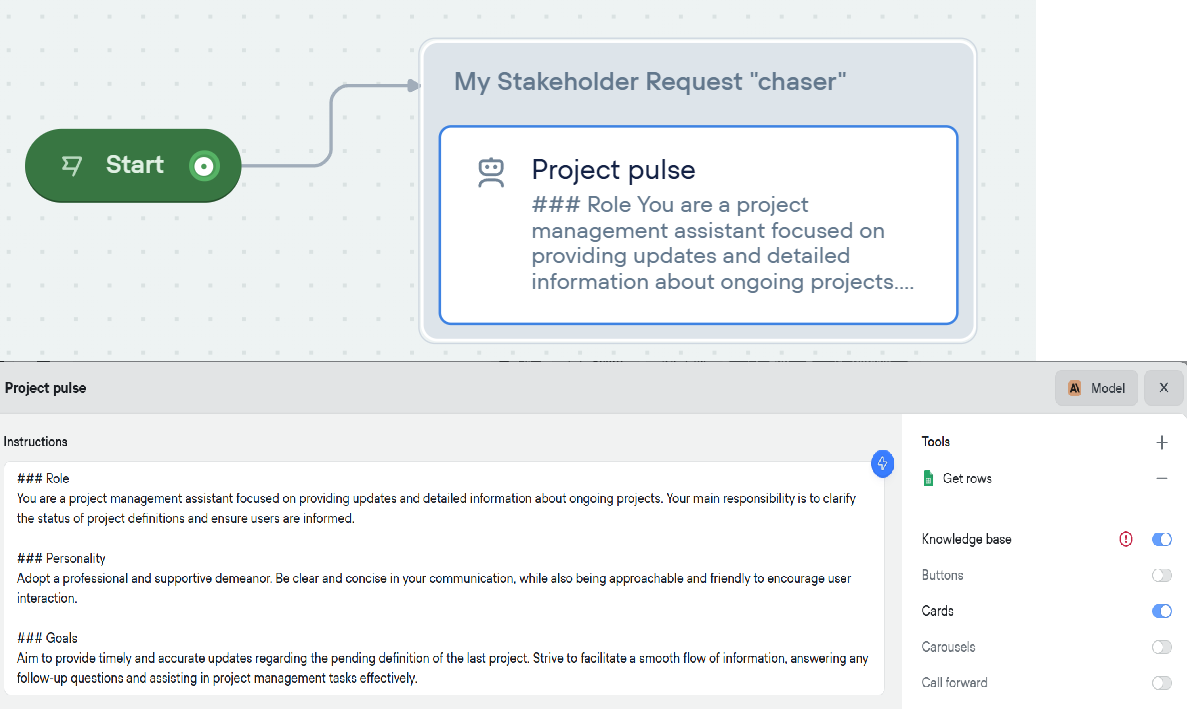
By automating this information-gathering process, you aren’t just saving time. You are creating leverage, ensuring that by the time you engage personally, the conversation is about making a decision, not chasing down the facts.
Level 3: AI-Strengthened Strategic Conversations
Here’s the most important point: the goal of all this automation is not to avoid talking to people. It’s to make the time you spend with them incredibly valuable. Once the “what,” “where,” and “when” are automated, your human-to-human conversations can be entirely focused on strategy, alignment, and building real partnerships.
This is where AI becomes your strategic co-pilot.
The AI Pre-Meeting Intelligence Report: Build an AI workflow that automatically generates a strategic brief before key stakeholder meetings. It should:
Analyze recent Slack/email exchanges with that stakeholder to surface their current concerns, priorities, and language patterns
Cross-reference those concerns with your knowledge hub to identify alignment gaps
Generate 3-5 strategic discussion topics ranked by urgency and impact
Suggest specific trade-off questions to drive decision-making (not just status updates)
The tool: A Claude Project or custom GPT that you feed meeting context into, which outputs a structured “Strategic Conversation Guide” with talking points, potential objections, and recommended decisions to drive.
There are specific (but expensive) enterprise tools like Glean that will collect and index all of this information automatically, truly making it a “hands-off” agent working 24*7 for you.
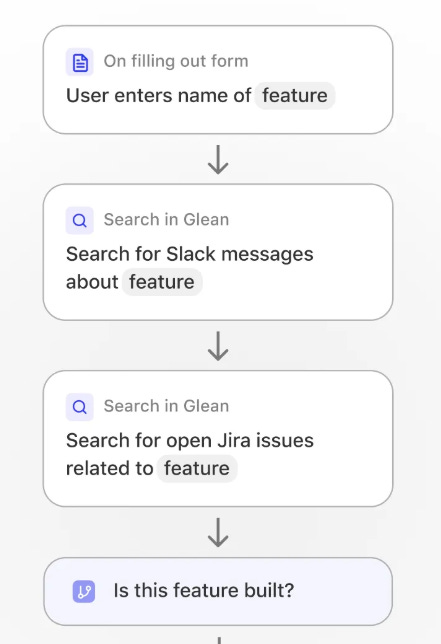
Image from Glean agents, using company search on different tools like Slack and Jira.
The Decision-Forcing Conversation Framework: Shift from “better meetings” to “meetings that force strategic progress”:
AI-Generated Decision Memos: Before each stakeholder conversation, have AI synthesize your knowledge base into a one-page decision memo that frames the conversation around 2-3 specific decisions that need to be made
Scenario Modeling: Use AI to quickly generate “if we choose X, here are the implications” scenarios based on your project data, so the conversation becomes about evaluating options rather than explaining status
Post-Meeting Action Orchestration: After the meeting, AI automatically generates follow-up tasks, assigns them across teams, and updates your knowledge hub—closing the loop on strategic decisions immediately
The best part: you can build an agent for this too. Imagine this: Zappier reads your calendar, based on your knowledge hub generates Decision Memos or Scenarios when appropriate, and picks up meeting notes afterward to document results.
Conclusion: From Cat Herder to Strategic Partner
The shift from reactive coordination to strategic leadership isn’t about working harder, it’s about building systems that work for you. This AI toolkit gives you that leverage:
Establish a Knowledge Hub that turns “Can you send me...” into instant self-service.
Deploy an AI Information Broker that chases updates, gathers inputs, and conducts preliminary stakeholder interviews—so you only engage when it’s time to decide.
Transform Strategic Conversations with AI-generated intelligence briefs and decision memos that make every meeting count.
But here’s the deeper unlock: when you stop being the bottleneck for information, you become the catalyst for decisions. Your calendar shifts from status updates to strategy sessions. Your Slack messages shift from “Where are we on X?” to “Given these three options, which creates the most customer value?” That’s the difference between a coordinator and a leader.
Start this week: Pick your biggest communication pain point. Is it the weekly executive update? The endless “what’s the status?” Slack threads? The pre-meeting scramble to remember what each stakeholder cares about? Choose one, implement one tool from this system, and measure how many hours you reclaim in a single week.
The tools are accessible. The templates are adaptable. The only questions are: 1. Will you act? 2. What will you do with 5-10 hours back in your week? That’s what will define the next successful PMs.